

Your team already uses AI. The question is whether it’s governed. We automate client intake, documents and billing, connecting email, documents, CRM/case management, e-signature and AI into one process where sources, permissions and logs stay under control.
 WhatsApp
 Telegram
 Gmail
Gmail Outlook
 DocuSign
 PandaDoc
 SignNow
 Clio
Clio MyCase
 PracticePanther
 Lawmatics
 Google Docs
 Google Drive
 DropboxWhatsAppTelegramGmailOutlookDocuSignPandaDocSignNowClioMyCasePracticePantherLawmaticsGoogle DocsGoogle DriveDropbox
 Notion
 HubSpot
 Pipedrive
 QuickBooks
 Xero
Xero Stripe
 Google Calendar
 Calendly
 Make
Make n8n
n8n Zapier
 OpenAI
 Google SheetsNotionHubSpotPipedriveQuickBooksXeroStripeGoogle CalendarCalendlyMaken8nZapierOpenAIGoogle Sheets
Contracts get signed by hand
Hours lost to intake and routine
First-touch enquiries, forms, collecting documents, the same emails, follow-ups and summaries by hand. Billable time goes to operations instead of cases.
AI moves into the work faster than the rules do
Handy tools get picked up, naturally. But without shared rules, logs and approval, the firm can’t guarantee where data ends up or where an answer came from. What’s missing is a governed process.
The inbound stream drowns in documents
PDFs, attachments, contracts, complaints, evidence dozens of pages long. While they’re read and checked by hand, deadlines grow and so does the risk of a missed clause or a hallucinated citation.
One System, Every Moving Part
An enquiry becomes a ready matter
A site, form or email collects the data, AI classifies the request, gathers documents, opens a matter, writes a summary and assigns the right lawyer. The client hears back faster, and the lawyer gets a clean brief to work from.


What changes, in numbers
We connect email, documents, CRM and e-signature with AI. Intake, contracts and knowledge search get faster, while sources, permissions and logs stay under control.


We build integrations with 100+ systems for law firms, among them:
- Integration with Stripe
- Integration with WhatsApp
- Integration with Gmail
- Integration with n8n
- Integration with Make
- Integration with Zapier
- Integration with OpenAI
- Integration with Outlook
- Integration with DocuSign
- Integration with PandaDoc
- Integration with Adobe Sign
- Integration with Xero
- Integration with QuickBooks
- Integration with Symfonia
- Integration with wFirma
- Integration with iFirma
- Integration with Fakturownia
- Integration with ClickUp
- Integration with Notion
- Integration with LinkedIn
- Integration with Cal.com
- Integration with DATEV
- Integration with Lexware
- Integration with Microsoft Teams
- Integration with Microsoft 365
- Integration with Microsoft Excel
- Integration with Microsoft Word
- Integration with Microsoft OneNote
- Integration with OneDrive
- Integration with iManage
- Integration with NetDocuments
- Integration with SharePoint
- Integration with Google Drive
- Integration with Dropbox
- Integration with Box
- Integration with Clio
- Integration with LEAP
- Integration with Actionstep
- Integration with Smokeball
- Integration with MyCase
- Integration with Filevine
- Integration with PracticePanther
- Integration with Lawmatics
- Integration with Harvey
- Integration with CoCounsel
- Integration with Lexis+ AI
- Integration with Spellbook
- Integration with Robin AI
- Integration with Luminance
- Integration with Ironclad
- Integration with Juro
- Integration with SignNow
- Integration with Autenti
- Integration with Oneflow
- Integration with Westlaw
- Integration with LexisNexis
- Integration with vLex
- Integration with EUR-Lex
- Integration with Relativity
- Integration with Everlaw
- Integration with KRS
- Integration with Slack
- Integration with ABBYY
- Integration with Azure Document Intelligence
- Integration with Google Document AI
- Integration with Azure OpenAI
- Integration with Anthropic Claude
- Integration with Mistral
- Integration with Qdrant
- Integration with Pinecone
- Integration with FillUp
- Integration with inFakt
- Integration with Comarch ERP
Already running these systems? We’ll plug into them.
DMS, case management, e-signature, research, email and accounting: find your tool and check we’re already integrated. If not, we’ll build the bridge.
73+ supported integrations







What legal clients say




Legal firm automation
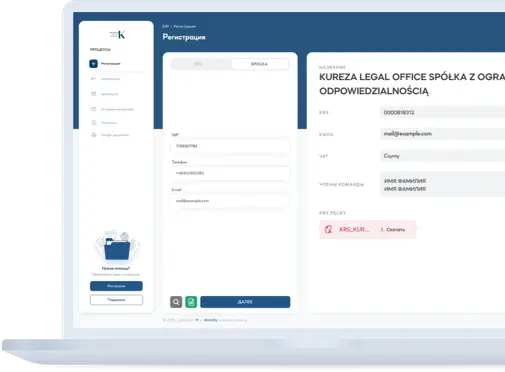
Automates client onboarding, document generation, and case management in one interface.
Frequently asked questions
Didn't find your answer?
Ready to cut the routine without losing control of risk?
Tell us about your stack and we’ll show where lawyers lose hours on intake, contracts and documents, and how to automate it with logs, sources and the lawyer’s final say.